Persistent alert style
Important reminders can keep re-arming every 5 minutes until handled, when supported by device permissions and settings.
 Remylo
Persistent reminder app for iPhone
Important tasks stay visible until done with persistent alerts, smarter snooze, overdue recovery, and repeating routines.
2-week free trial when eligible. No account required.
The one-alert problem
Sometimes you saw the alert and still could not act. Sometimes you snoozed it. Sometimes the notification was dismissed and the task went quiet. Remylo is built for the follow-through gap after that moment.
Persistent reminder loop
Remylo does not add noise for its own sake. It gives important tasks a sequence: prepare before the alert, ask for a response, return after snooze, recover when overdue, and advance when done.
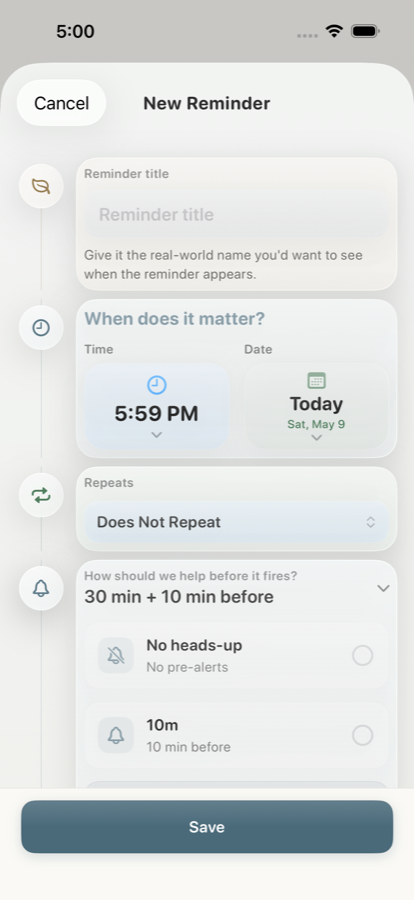
Heads-up reminders can warn before the main alert so the task has a runway.
On supported iPhones, AlarmKit can create an alarm-style reminder that asks for a clearer response.
Snooze should make delay recoverable. Remylo can bring the same task back instead of letting delay become disappearance.
Overdue reminder actions make the next step visible when the first moment was missed.
Done clears one-time tasks. Smart Repeat advances recurring reminders to their next occurrence.
Follow-through features
Remylo is not trying to make every reminder louder. It gives important reminders a more durable path when one notification is not enough.
Important reminders can keep re-arming every 5 minutes until handled, when supported by device permissions and settings.
Gentle, normal, and aggressive profiles can shorten follow-up intervals as the same task keeps slipping.
Eligible overdue reminders can return with quick actions like In 10 min and Tomorrow.
Before and after
Honest limits
Alarm-style alerts require supported iPhones, permissions, and Apple system availability.
Reminder data stays on device and can sync through your private iCloud account.
Remylo supports stronger follow-up when you choose it, while keeping the experience practical rather than shame-heavy.
Questions
For real-life delay
2-week free trial when eligible. No account required. Private by design.